
Phishing emails are a common type of online scam in which fraudsters pretend to be legitimate businesses or individuals to trick recipients into sharing sensitive information, clicking malicious links or making payments.
These emails can sometimes appear to come from businesses you know and trust, including it’seeze, Spoton.net or your local it’seeze representative.
Understanding how to recognise suspicious emails and knowing what to do if you receive one can help protect you and your business.
How to recognise a phishing email
Phishing emails are designed to look convincing, but there are several warning signs to look out for.
1. Unfamiliar or suspicious sender addresses
Some phishing emails are sent from free email services such as Gmail, using addresses that may resemble a business name or someone you know. For example:
- person.name@gmail.com
- company.name@gmail.com
Please note: We do not send unsolicited business emails from Gmail addresses.
Genuine emails from us will usually come from addresses ending in:
- @itseeze.com
- @spoton.net
- @itseeze-[region].co.uk (where [region] represents communication from your local regional representative)
However, scammers can disguise or spoof email addresses, so even an email that appears to come from a familiar address should be treated with caution if its content seems unusual.
2. Unexpected requests for information or payment
Be cautious of emails asking you to provide passwords, banking details, personal information or make an unexpected payment.
3. Urgent or threatening language
Fraudsters often create a sense of urgency, claiming that an account will be suspended, a payment is overdue or immediate action is required.
4. Suspicious links or attachments
Unexpected links and attachments may direct you to fraudulent websites or contain malicious software. Avoid opening them if you are unsure of the sender or the message.
5. Unusual wording or unexpected messages
Spelling mistakes, unusual formatting and unfamiliar language can be warning signs. However, modern phishing emails can also be professionally written and difficult to distinguish from genuine communications.
Why am I receiving phishing or spam emails?
Receiving a suspicious email doesn't necessarily mean that your website or email account has been compromised.
Spammers and scammers can collect email addresses from publicly available sources, including:
- Business websites displaying contact email addresses
- Online business directories
- Social media profiles and posts
- Other publicly accessible online information
Automated tools can collect these addresses, which may then be used to send unsolicited emails or targeted phishing attempts.
Even if your email address isn't publicly displayed, it may still be obtained through other means, such as a data breach involving a third-party service.
What should I do if I receive a suspicious email?
If you receive an email that appears suspicious or claims to be from a business or individual you recognise but doesn't seem genuine:
- Do not reply or engage with the sender.
- Do not click any links or open attachments.
- Do not share sensitive information, including passwords, banking details or personal information.
- Report the suspicious email using the appropriate method below.
- Delete the email once it has been reported.
How to report phishing emails
For clients in the United Kingdom
Forward suspicious emails to:
This is the official phishing reporting service operated by the UK's National Cyber Security Centre (NCSC).
You can find further information on the UK Government's phishing reporting website.
For clients in the Republic of Ireland
Use the 'Report phishing' or 'Report spam' option provided by your email service, such as Gmail or Outlook.
If you believe you have been the victim of fraud, you should report the incident to An Garda Síochána through your local Garda station.
You can also find cybersecurity guidance on the National Cyber Security Centre Ireland website.
How can I reduce the risk of receiving spam and phishing emails?
While it's not possible to prevent all unwanted emails, there are several practical steps you can take to reduce your exposure.
Use a contact form on your website
Consider using a contact form rather than publicly displaying your email address. This makes it harder for automated tools to collect your address, particularly when appropriate spam protection is in place.
Avoid displaying clickable email links
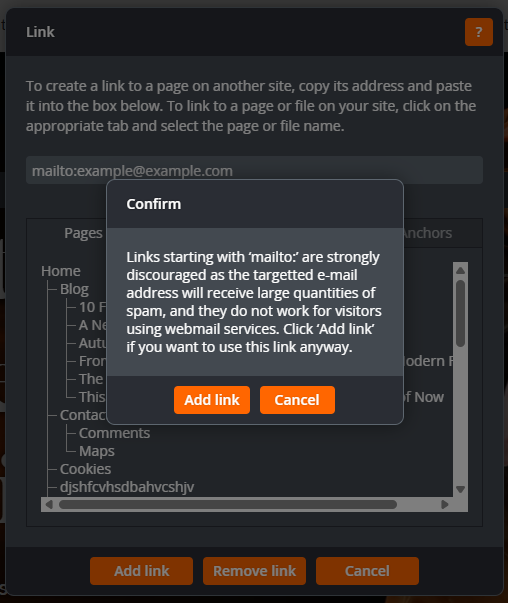
Links beginning with 'mailto:' can make email addresses easier for automated tools to identify and collect. Where possible, consider using a contact form instead.
Simply removing the clickable link won't prevent harvesting if your email address is still visible on the page.
Be mindful of what you share publicly
Review the contact information displayed on your website, social media profiles and business directory listings. Only publish information that needs to be publicly available.
Keep your spam filters enabled
Make sure your email provider's spam and phishing protection features are enabled and kept up to date. These can help identify and filter potentially harmful messages before they reach your inbox.
Be cautious with unsolicited emails
Treat unexpected requests for personal information, passwords or payments with caution, even if they appear to come from a familiar business or individual.
What if I've already clicked a link or shared information?
If you've interacted with a suspicious email, it's important to act quickly.
- Clicked a suspicious link? Avoid entering any information and seek advice from your IT support provider, particularly if anything was downloaded.
- Entered a password? Change it immediately through the genuine website or app. If you've used the same password elsewhere, change it on those accounts too.
- Shared banking details or made a payment? Contact your bank immediately using its official contact details.
- Opened a suspicious attachment? Contact your IT support provider for advice, as the attachment may contain malicious software.
You should also report the incident using the relevant reporting guidance above.
Stay vigilant
Phishing emails are an ongoing risk for businesses of all sizes. Fraudsters continually change their methods, so it's important to remain cautious, even when an email appears to come from a company or person you recognise.
Remember: If an email seems suspicious, don't engage with it. Report it using the appropriate reporting method and delete it.
Taking a few simple precautions can make a significant difference in protecting your business and personal information.
